Open source 3-D printers
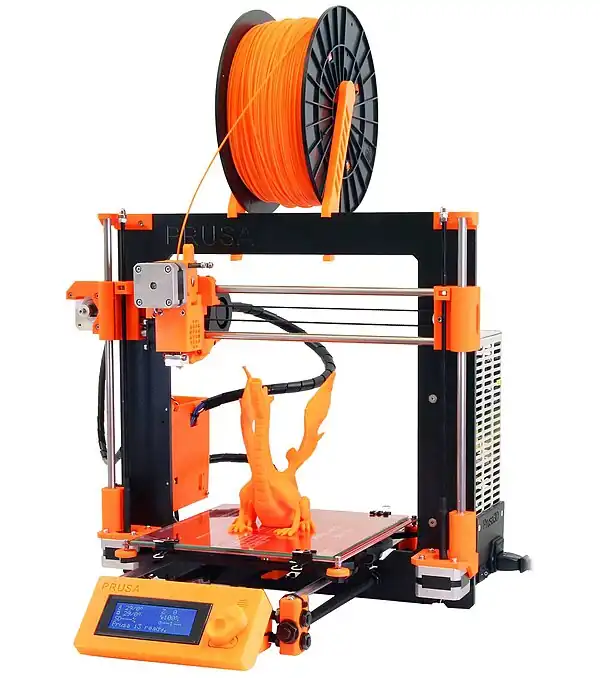
3D printers can be bought so as to set up your own fabrication center or fab lab.
A fabrication center allows to produce large batches of a limted range of 3D models, whereas a fab lab is more of a research center where prototype designs are printed further assessment before giving the go ahead to produce it in large quantities. Fabrication centers hence suffice with 1 or several low-cost 3D printers, where fab labs tend to require a collection of different (expensive) machines.[1]
If you don't need to produce large batches of a same 3D model, it may make sense to use a 3D printing service. These either have local fabrication centers near your location where you can then pick up your printed model, or they produce it further away and then ship it via a parcel service to your doorstep.
If you want a 3-D printer, by far the least expensive method to get one, is to build it yourself from open source designs. A RepRap, which you can build yourself for under $600 is detailed here on Appropedia, for other designs see below.
List of open design 3-D printers
There are now several open design 3-D printers on the market for example:
- RepRap.[2] See this article for the basic idea. Again you can buy a setup for 795 pounds here but also build it yourself. The really interesting thing about this model is the machines can produce themselves - at least to some degree. For some examples of what it can do see this. Makeshift RepRaps, or Repstraps
- The original Fab@Home
- MakerBot Industries -- Although they have CupCake CNC kits for sale -- all the plans are available - it says "I am an open, hackable robot for making nearly anything". See a video from CES 2010 on the CupCake here. The old makerbots are open source - not so with the new one.
- ORD Bot Quantum 3D printer
- Some others may be found at the 3-D printing article at the P2P Foundation
There are a lot of interesting possibilities for the use of such 3-D printers to create appropriate technologies for sustainable development. This is the beginning.
For more on 3-D printers and open sourced sustainable development see this Journal of Sustainable Development article
Metal 3D printers

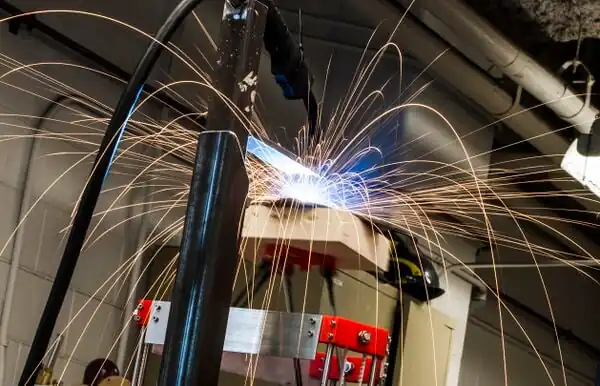
Technical progress in the open-source self replicating rapid prototyper (RepRap) community has enabled a distributed form of additive manufacturing to expand rapidly using polymer-based materials. However, the lack of an open-source metal alternative and the high capital costs and slow throughput of proprietary commercialized metal 3-D printers has severely restricted their deployment. The applications of commercialized metal 3-D printers are limited to only rapid prototyping and expensive finished products. This severely restricts the access of the technology for small and medium enterprises, the developing world and for use in laboratories. This paper reports on the development of a <$2000 open-source metal 3-D printer. The metal 3-D printer is controlled with an open-source micro-controller and is a combination of a low-cost commercial gas-metal MIG welder and a derivative of the Rostock, a deltabot RepRap. The bill of materials, electrical and mechanical design schematics, and basic construction and operating procedures are provided. A preliminary technical analysis of the properties of the 3-D printer and the resultant steel products are performed. The results of printing customized functional metal parts are discussed and conclusions are drawn about the potential for the technology and the future work necessary for the mass distribution of this technology.
For the latest MOST metal RepRap 3D printer see this
New software: Slicer and process improvements for open-source GMAW-based metal 3-D printing
Alternatives
Most low-cost 3D printers are not suited for printing metals, because this requires a very sturdy 3D printer that can also withstand high heat.
However, we can still make 3D objects using these printers, by using the 3D printer as a a intermediate step. This is done as follows:
- we first print out a model using a 3D printer in another material
- we then make a mould of this (ie in sand, ...) and then use the moulds to make duplicates
Enclosure
Some 3D printers come standardly with an enclosure/case. This enclosure serves to minimise the amount of toxic fumes that are produced while printing. Toxic fumes are produced when printing with almost any material that is toxic in nature (the only 3D printing material that isn't toxic being PLA). If your 3D printer does not come with a case, consider building a case around it yourself, there are many DIY articles on this to be found on the internet. Also put your 3D printer in your garage, or another space you don't come too frequently, and/or can be ventilated well. The most optimum case design would include building a fully enclosed case, together with an air outlet at the top (with cloth filter and a fan behind it), having the side panels slightly oversized (say 150%, at least in length) and having an air inlet on one of the side panels, near the bottom (again with cloth filter). This way, solid plastic particles will fall in the empty space below the printer, within the enclosure, and heat and very small particles are sucked upwards into the filter; the particles remain in the filter, while the heat remains to heat the room of the house, and can no longer cause overheating the nozzle.
Applications
See: Open source 3-D printing of OSAT#Examples
Design competition
References
See also
- 3-D printing
- Recyclebot: add-on module for 3D printers (at present supports only RepRap), allowing to use waste plastic to print the 3D models
- Open source rapid prototyping of OSAT
- OMG Challenge to use waste plastic in open source 3-D printers
- How to build a 3D printer from scratch - good starting point for those who want to create a 3d printer from scratch.
- 3D Printer Buying Guide
| Authors | KVDP |
|---|---|
| License | CC-BY-SA-3.0 |
| Cite as | KVDP (2010–2025). "Open source 3-D printers". Appropedia. Retrieved November 28, 2025. |